還原1.1.3 app catalog
1.自己去找下載連結。。。

2. 把檔案放到Palm Pre 的USB storage (放在第一層)
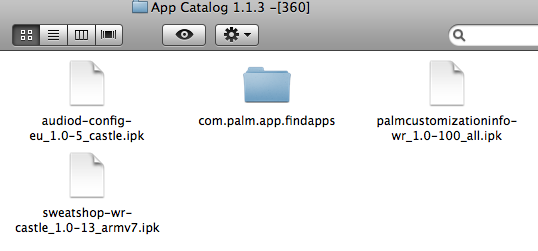
3. 執行WebOSQuickInstall, 先安裝optware (我自己係全數安裝optware 的library), command shell
4. 執行以下命令 (Tools -> Linux CommandLine) , 注意space , 可以copy and paste 去執行.../
mount / -oremount,rw
/usr/bin/ipkg -o /var install /media/internal/audiod-config-eu_1.0-5_castle.ipk
/usr/bin/ipkg -o /var install /media/internal/palmcustomizationinfo-wr_1.0-100_all.ipk
/usr/bin/ipkg -o /var install /media/internal/sweatshop-wr-castle_1.0-13_armv7.ipk
cp -Rf /media/internal/com.palm.app.findapps/* /usr/palm/applications/
reboot
(小知識:由於WebQuickOSInstall 不支援cd 指令,所以用了absolute path ...
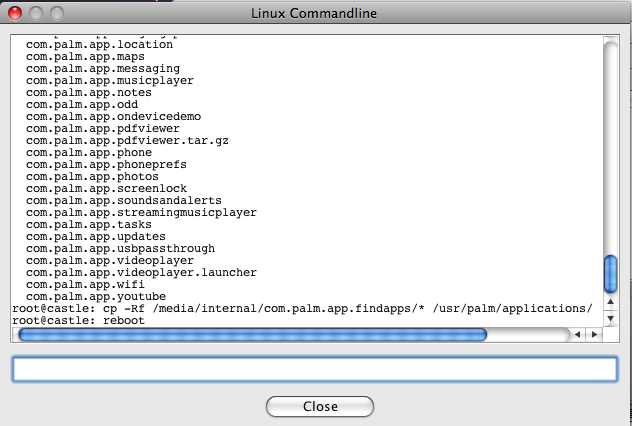
完成後可以重新使用app catalog ~
要備份舊的app catalog, 可以先輸入以下指令:
# mkdir /media/internal/findapps-1.3.1
# cp -r /usr/palm/applications/com.palm.app.findapps/ /media/internal/findapps-1.3.1
如果下載不到,都可以用webOS Doctor 找出以上檔案:
source : http://forums.precentral.net/gsm-pre/213041-what-i-have-done-keep-app-catalog-after-flashing-1-2-1-firmware.html
I have an o2 german Pre, so with 1.1.3 firmware. I have flashed it with the 1.2.1 Bell firmware and here is the process to not loose the app catalog (should be the same withe sprint firmware).
Open the webosdoctor jar of your "normal" firmware with something like 7zip (don't extract de jar, just open it). Click on "resources". You will see 2 .tar files. In my case, with the german 1.1.3 O2 firmware, i have "wr.tar" and "webos.tar".
Click on "wr.tar" and you will find 3 .ipk files. Extract those .ipk directly on your Pre (so connect you pre to your PC and choose USB drive Go back and click on "webos.tar", then click on ".", then click on "nova-cust-image-castle.rootfs.tar.gz", then Click on "nova-cust-image-castle.rootfs.tar", then click on ".", then click on "usr", then click on "palm"a and click on "applications". Extract "com.palm.app.findapps" folder directly to you Pre.
- Details
- Category: Palm Pre
速成輸入法 mojo.js 1.2 For WebOS 1.3.1
有網友想要一個速成輸入法, 所以做了一個
WebOS 真係好,用javascript 寫,好容易轉到內容~~
Download :
- Details
- Category: Palm Pre
IBM 不再支援DB2NSF
IBM 唔會再支援DB2NSF ....
Lotus 8 (7係係測試此功能) 開始正式加入DB2 支援,可以將資料推到DB2 上,效能可以更快,
但係以後都唔會再支援此功能,用緊的,去到2017 年後唔再有支援。。。。IBM 話太少人用喎。。。。
不過我都係咁話,有NSF 咁方便唔用,備份變動都簡單,無謂學Exchange 咁偉大,死一個EDB 全部信一齊無晒 ...
http://www-01.ibm.com/support/docview.wss?uid=swg21384421
- Details
- Category: Lotus Domino
1.3.1 的App Catalog 在香港會不顥示軟件。。。
原來palm 在1.3.1 的app catalog 會跟你所在地區顯示軟件, 例如在美國以外不會顯示ypmobile , 但係原來係developer 在submit 軟件時選取地區,但係只有美國,墨西哥或歐洲等地,因此在香港區會無軟件供應
PreCentral 有網友提供了解決方案
- Details
- Category: Palm Pre
倉頡輸入法 for 1.3.1 GSM
我將個倉頡輸入法轉了給GSM 1.3.1 ....
Again:
Source : http://code.google.com/p/ime4webos/downloads/list
發起人:http://www.treo8.com/bbs/viewthread.php?tid=142783&extra=&page=1 (由treo8 網友發起)
設定:http://www.garyau.com/zh/palm-pre/13-palm-cim-changjai.html
- Details
- Category: Palm Pre
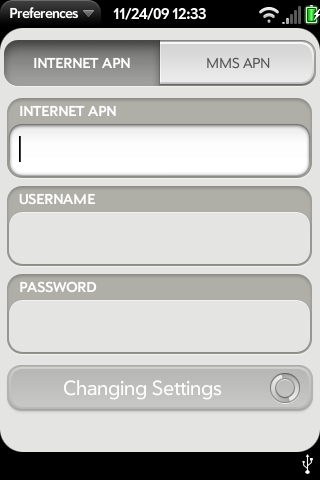
Palm Pre GSM 都有APN 設定
Palm Pre GSM 都有APN 設定Palm Pre 1.3.1 都有APN 設定,其他電話公司的上網設定都可以用了~~ 不用再受限於某電話公司
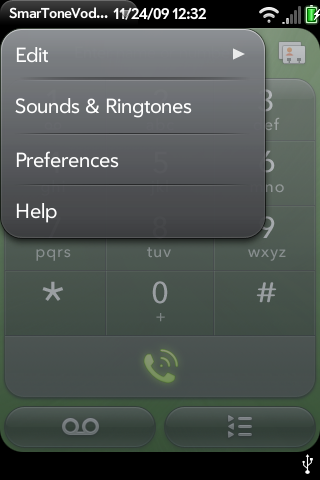
打開phone 程式,按左上角,按preferences
推manual settings 到on 住置
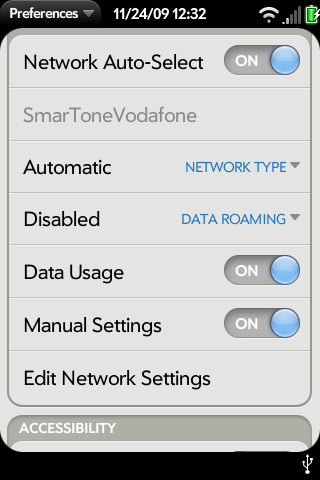
輸入APN 設定
- Details
- Category: Palm Pre
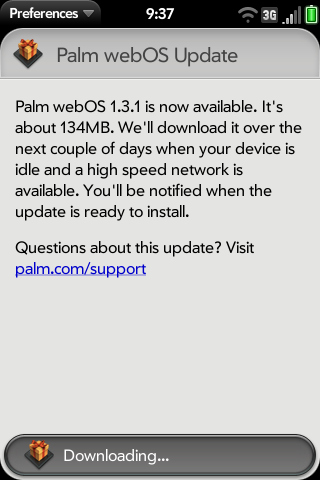
Palm Pre GSM 都有1.3.1 update 啦~~
今日早上(23 Nov 2009) 已經見到GSM Palm Pre 的1.3.1 update 啦
至少已知的,係classic 都可以做network hotsync ~
按system update 的program ,會見到有這個update , 或者只要上到網, 佢都會自行download
Reminder : 記得移走所有patch , 先至update !! (係preware, 有Linux application -> utilities -> Emergency Patch Recovery)
個更新只係會overwrite 系統程序,只要不是patch 或linux system program (e.g. Optware) , 都會保留,而相片及歌,放在USB storage 的部份,都不會移走,不過,做更新之前,做一次備份都係好習慣
- Details
- Category: Palm Pre
Page 58 of 61